

Fisheye Cameras for Complete Property Coverage
[yasr_overall_rating]
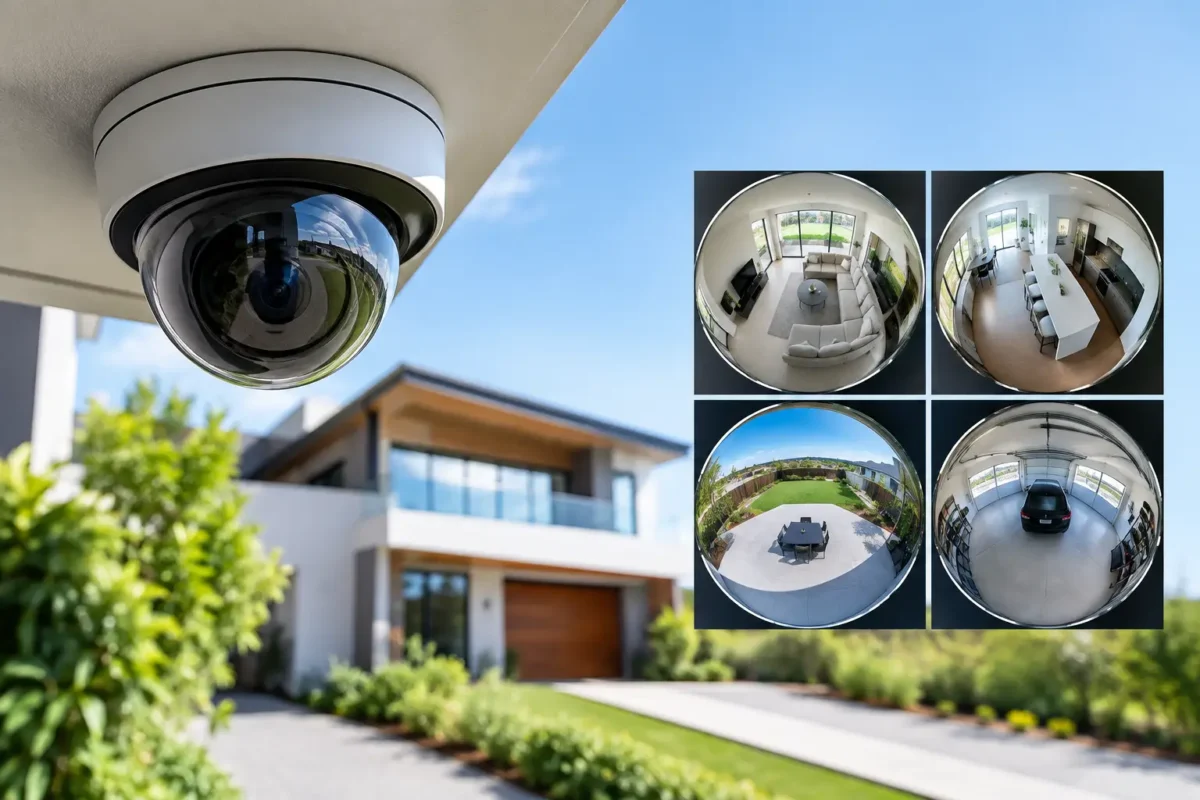
A single camera mounted at the center of a retail floor, lobby, daycare classroom, or warehouse can show the entire room. That is the practical advantage of fisheye cameras: broad, continuous visibility from one carefully selected mounting point. For property owners and facility managers trying to reduce blind spots without filling every ceiling tile with cameras, that can change the design and cost of a security system.
The trade-off is simple. A fisheye camera is not the right answer for every view. It captures a very wide image, often up to 180 or 360 degrees, but it is not designed to identify a face across a parking lot or read a license plate at a gate. The strongest systems use fisheye coverage where complete scene awareness matters and pair it with targeted cameras where detail matters.
Where Fisheye Cameras Deliver the Most Value
Fisheye cameras are built for open areas where activity can happen in several directions at once. A conventional fixed camera points at one scene. A fisheye unit looks outward from a central position, allowing a security team to review movement across an entire room or broad outdoor zone from a single recording.
For a smoke shop, this can mean full coverage of the sales floor, point-of-sale area, and customer paths from a ceiling-mounted camera. For a daycare, it can provide a high-level view of a classroom or indoor play area while avoiding the clutter of multiple visible devices. In a warehouse, loading area, or auto shop, a fisheye camera can document workflow, receiving activity, and access points in the same view.
They are also useful in apartment lobbies, office reception areas, hall intersections, stairwell landings, elevators, restaurants, and small parking areas. The common factor is an open space with several directions to monitor. A properly placed fisheye camera can reduce equipment count, cabling runs, switch ports, and installation disruption.
That does not always mean it is the lowest-cost choice. Business-grade fisheye models with strong image sensors, infrared illumination, vandal-resistant housings, and advanced dewarping features may cost more than a basic fixed camera. The value comes from designing fewer cameras to cover the same usable area without creating blind spots.
How a Fisheye Image Becomes a Usable Security View
The raw image from a fisheye lens is circular or heavily curved. Straight walls, counters, and door frames may appear bent at the edge of the image. This is normal. The camera lens is capturing an extremely wide field of view, not producing the traditional rectangular image people expect from a standard dome or bullet camera.
Dewarping software corrects that curved image into practical viewing modes. Depending on the camera and recorder, a user may see a full 360-degree overview, a panoramic strip, or several virtual camera views showing different sections of the room. A manager reviewing an incident can move between these views without installing several physical cameras.
The quality of dewarping matters. It should work reliably in the recorder, desktop software, mobile app, or video management system your team will actually use. Some cameras offer onboard dewarping, while others rely on the network video recorder or client software. Before selecting equipment, confirm that the chosen viewing method supports the layouts your staff needs.
A live overview is useful, but recorded playback is where the system proves its value. If an employee reports a missing item, a customer dispute, or an after-hours intrusion, the video should make it easy to follow a person across the entire area. The system should not force staff to hunt through distorted footage or switch among disconnected camera angles.
Mounting Position Determines the Result
Fisheye cameras are most effective when the installation location is planned before the camera is purchased. Center ceiling mounting is often ideal for 360-degree coverage indoors. The higher the camera is mounted, the larger the area it sees, but people and objects become smaller in the image. Mount it too low and shelving, light fixtures, signs, or furniture may block sections of the scene.
A wall-mounted fisheye camera can provide a 180-degree view, but it requires a different lens orientation and coverage plan. This approach can work well over a storefront entrance, near a lobby wall, or under an exterior overhang. It is less suitable when the goal is to see every part of a square room.
Before installation, identify the practical questions that determine placement: Where do people enter and exit? Are there tall displays, partitions, or racks? Is there a cash wrap or high-value inventory zone that requires closer identification? Will the camera be exposed to weather, vandalism, or poor lighting? A site review often reveals that one fisheye camera can cover the general area, while one additional fixed camera is needed for a critical detail view.
For outdoor installations, mounting height and lighting deserve extra attention. A fisheye mounted under an awning may capture a broad section of a storefront or small lot, but headlights, streetlights, rain, and reflections can affect footage. An outdoor-rated camera with appropriate infrared performance, weather protection, and wide dynamic range should be selected for the actual conditions, not just the advertised coverage angle.
Specifications That Matter More Than Marketing Claims
Resolution is a major consideration with fisheye cameras because the sensor spreads pixels across a very broad scene. A higher-resolution model provides more usable detail when operators digitally zoom into one part of the image. However, more resolution also increases storage requirements, network bandwidth, and recorder processing needs.
For many indoor business applications, the right choice depends on ceiling height, room size, and the level of identification required. A small office lobby has very different needs from a large retail floor or industrial shop. It is better to select resolution based on the usable detail at key locations than to choose the highest number on a specification sheet.
Low-light performance is equally important. Fisheye cameras often monitor spaces after employees leave, when lights may be dimmed or turned off. Look at the camera’s sensor performance, infrared range, wide dynamic range capability, and how it handles mixed lighting near doors and windows. A camera that looks excellent at noon can struggle with a bright entrance and dark interior after sunset.
Also consider storage design. Continuous recording preserves the full story of an incident, but it requires more storage than motion-based recording. Motion rules can be useful, although wide-angle scenes may generate frequent events in busy stores, offices, or facilities. Retention goals, operating hours, camera count, resolution, and frame rate should all be calculated before selecting a recorder and hard drives.
Fisheye Cameras vs. PTZ, Dome, and Bullet Cameras
A fisheye camera excels at wide-area awareness. It does not physically zoom, track a subject over long distance, or deliver the same detail as a dedicated varifocal camera aimed at a doorway. For that reason, it should be part of a layered camera design rather than treated as a universal replacement.
A PTZ camera is useful when an operator needs to follow activity across a larger property, such as a parking facility, construction site, or perimeter. It can provide close views, but it can only look in one direction at a time. A fisheye camera records the entire covered scene simultaneously, which is often better for reviewing events that happened outside an operator’s immediate attention.
Fixed dome and bullet cameras are usually the stronger choice for entrances, cash registers, vehicle lanes, loading gates, and other locations where face-level or plate-level detail is needed. A common commercial design uses a fisheye camera for overall coverage and fixed cameras for verification. That combination gives management both context and evidence.
Installation and Support Should Be Part of the Plan
A fisheye camera system depends on more than the camera itself. Cable pathways, PoE switch capacity, recording hardware, network segmentation, remote access permissions, camera aiming, software configuration, and staff training all affect daily performance. An excellent camera installed on the wrong network or paired with an undersized recorder will not deliver dependable evidence when it is needed.
For businesses with multiple locations, standardizing camera models and viewing layouts can simplify training and remote oversight. For homeowners, professional setup can prevent common problems such as poor Wi-Fi coverage, recording gaps, app access issues, and cameras placed too high or too far from the activity that matters.
Tech Security USA can help evaluate the property, recommend business-grade equipment, coordinate professional installation, and provide same-day support after deployment. The goal is not to install the most cameras possible. It is to build a system that captures the right information, stores it correctly, and remains easy to use when an incident occurs.
The most useful next step is a coverage review of the actual space. Bring a floor plan, photos, or a simple walkthrough of the areas that create the most concern, then design the fisheye view around real movement patterns, lighting conditions, and the details you may need to prove later.
Posted on GoogleTrustindex verifies that the original source of the review is Google. I visited the Tech Security USA orange to install security cameras for my home. I found it a very professional company, with high quality products that were made me impressed. I recommend it to anyone who are looking a professional security cameras company in onrange city of Orange County CA.Posted on GoogleTrustindex verifies that the original source of the review is Google. “Edit (this review is not “spam” which the owner claims it is and the story is absolutely real however it was about 2 years ago and if I wasn’t shy back then(9th grade) or I wish I had done/said something about my dad and I being taken advantage of as it was a scam (quoted at around $150 but after having to wait 3weeks instead of 3 days for the guy to charge us $300 for a cheap screen that no longer had a haptic button or working Touch ID along with many white pressure dots along the edges). Do not go here. If you look at most of their 5-star reviews, they are older than 7 years. I went here recently to fix my iPad Air (3rd gen). The problem was the screen's backlight wouldn't work, so it would just show a black image. The technician said he could get it done for around $150 and in 2-3 days he would call us (my dad and I). After a week of waiting, we decided to call but to no avail. We went to the place to check up on the work done, if any. We got there and the iPad was in the exact same spot as the day we left it there. The guy told us it would be ready in about 4 days, no later, and that he would call us. We never got the call, so we went back after about another 3 days of waiting for a call (2 weeks now). After waiting, we went back to the store for the iPad, and it appeared to us as if he had just gotten started by breaking the screen to replace it. After another week, we came back and he pulled it out from a drawer saying something along the lines of, "I was about to call you guys." The screen was working, but it was clearly a cheap screen that was ordered online, and the Touch ID didn’t work anymore. The button was replaced with a non-haptic one. There are many white dots along the edges of the screen that look as if someone pressed their thumb down too hard for too long. The guy said with all the "extra" work done to it, the new total would be $300. When my dad and I looked at each other, we knew that wasn’t right, but I watched my dad grab his wallet and pay. I wish I had said something because we were taken advantage of, and after a week, the iPad's screen isn’t functioning properly as it feels unresponsive.Posted on GoogleTrustindex verifies that the original source of the review is Google. Will somebody please tell the owner to stop responding? She’s only validating the bad reviews.Posted on GoogleTrustindex verifies that the original source of the review is Google. Little messy inside but brought an old Moto Z2 Play in to finalize my failed battery self install. Done when promised, phone looked as good as new and works fine. I'm happy.Posted on GoogleTrustindex verifies that the original source of the review is Google. Garbage screen quality do not come here the screen is more different then a regular apple screen they use low quality screens the whole screen shattered and has black lines throughout it after a tiny drop with a screen protector.Posted on GoogleTrustindex verifies that the original source of the review is Google. I needed a battery replacement for my Huawei p10, the engineer fixed it in a few days (he had to order the battery) and it was reasonable priced, very good, thank youPosted on GoogleTrustindex verifies that the original source of the review is Google. Great location and employees. Really came through when I needed help. Recommend this place to anyone.Posted on GoogleTrustindex verifies that the original source of the review is Google. My go to place for any laptop and iPhone repairs. Also very friendly and experienced guy James.
Resent Posts

Surveillance System Maintenance Guide for Uptime
19 October 2026
How to Improve Alarm Response at Your Property
17 October 2026
Table of Contents